|
<< Click to Display Table of Contents >> Elprocad converter |
  
|
|
<< Click to Display Table of Contents >> Elprocad converter |
|
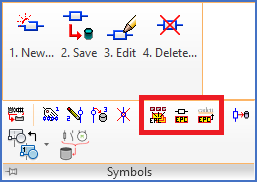
Figure 2300: The three main command of the Elprocad converter is found in the "Symbols" slide-out panel of the "Tools" tab in the ribbon menu.
Elprocad is a simple but still well-spread Swedish electrical design software. It is available in versions based on AutoCAD and BricsCAD.
Since cadett ELSA offers superior functionality and performance, there is an obvious need to migrate from Elprocad to cadett ELSA. To facilitate that process, tools to convert documentation created in Elprocad to cadett ELSA is included at delivery.
The Elprocad converter of cadett ELSA is made up of several individual commands and other tools.
One command makes it possible to separate sheets in Elprocad multi-sheet drawings and save them as separate DXF files. Other commands are used to convert individual Elprocad symbols or all symbols in a drawing sheet to the cadett ELSA standard, so that they work just like regular cadett ELSA symbols, meaning fully OnLine.
WORTH NOTING
The quality of the conversion result cannot, for obvious reasons, be much better than the quality of the drawings from the beginning. If the sheets are predominantly drawn without "intelligence", with a lot of TEXT and LINE objects instead of true symbols, the end result will unfortunately also be relatively “dead” with regard to the OnLine Engine and all its associated functionality.
Please refer to the sub-topics listed below for full explanations.
•Preparing a project for Elprocad conversion
•Copying original DWG files to the project
•Convert to DXF and collect in Drawing Manager
•Split Elprocad multi-sheet drawing
•Convert single Elprocad symbols
•Convert Elprocad drawing sheets
•0ELPROCAD-CADETT_ELSA Script Sequence