|
<< Click to Display Table of Contents >> Convert single Elprocad symbols |
  
|
|
<< Click to Display Table of Contents >> Convert single Elprocad symbols |
|
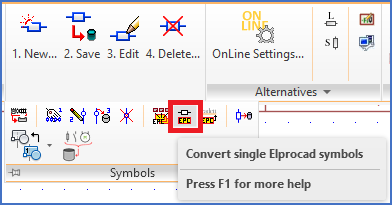
Figure 2307: The "Convert single Elrpocad symbols" command
The most important part of the conversion of Elprocad drawings to cadett ELSA is a symbol conversion. This means that Elprocad symbols are converted to cadett ELSA symbols, in order for the OnLine Engine to recognise these symbols and thereby being able to handle them intelligently. To do that, attribute names are changed and the symbol is registered in the symbol database of cadett ELSA. The graphics remains unchanged, which means that the symbols will still look like Elprocad symbols. The symbol definition itself - the block definition - will not be updated with the changes that are made to the inserted symbols. The block will not be saved in the symbol library of cadett ELSA either. The conversion is only made in a way that makes correct interpretation of the symbols possible for the OnLine Engine.
Please note that the symbols will remain in their original layers. This means that the layer setting in cadett ELSA may have to be adjusted, or you may have to move the symbols to a layer that is electrical in cadett ELSA, like layer 0.
The Convert single Elprocad symbols command is used to convert single selected Elprocad symbols to cadett ELSA symbols. You select the command in the ribbon menu, as shown in the figure above. The command asks you to select a symbol, which is then immediately converted.