|
<< Click to Display Table of Contents >> Symbol selection |
  
|
|
<< Click to Display Table of Contents >> Symbol selection |
|
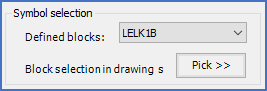
Figure 806: The "Symbol selection" section
There are two ways available to select which symbol to investigate.
•You can click the Pick>> button and thereafter select the symbol in question directly in the circuit diagram.
•You can use the drop-down list directly above and select the symbol by name among all the symbols that are inserted in the current drawing sheet.
When you have selected a symbol to investigate in one of these methods, the dialogue box will be populated with information about that very symbol.
Please refer to the topics that are listed below for more details about the presented information and what you can do about it.
•Symbol data stored in drawing sheet
•Symbol data stored in symbol database