|
<< Click to Display Table of Contents >> Insert data |
  
|
|
<< Click to Display Table of Contents >> Insert data |
|
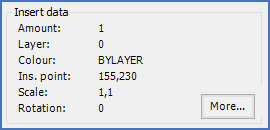
Figure 808: The "Insert data" section
In the Insert data section, insertion information about one inserted and specifically selected symbol is presented. For a symbol that is selected by name, most of this information must be left out since there might be multiple insertions of the same symbol, all with different insertion information.
The table below explains the information that is presented in the Insert data section.
If you press the More... button, a presentation of additional information will be made. Please refer to the sub-topic listed below, which contains a description of that feature.
Field |
Explanation |
|---|---|
Amount |
Number of times the selected symbol is inserted in the current drawing sheet
|
Layer |
The layer in which the selected symbol is inserted
|
Colour |
This field shows the colour that is defined for the inserted symbol. Under normal circumstances in cadett ELSA, this should always be BYLAYER.
|
Ins. point |
The x and y coordinates in which the selected symbol is inserted
|
Scale |
This field shows the scale of the inserted symbol in x and y directions. For ordinary circuit diagram symbols in cadett ELSA, this should always be 1,1, but there are some exceptions to that rule, like boundary boxes.
|
Rotation |
This field shows the rotation of the inserted symbol around its insertion point. For ordinary circuit diagram symbols, this should always be 0, but there might be some exceptions to that rule, for instance legacy terminals, which could be rotated to switch the internal and external sides.
|
The sub-topic listed below describes the More... button.