|
<< Click to Display Table of Contents >> Symbol data control… |
  
|
|
<< Click to Display Table of Contents >> Symbol data control… |
|
The Symbol data control feature enables you to check individual symbols for any differences between the symbol itself and the corresponding data in the symbol database. It also gives you an effective tool to fix deviation errors that you might find. Symbols missing in the symbol database can for example be fixed using this feature.
The reason for this even being possible, is that a backup of the symbol database content is stored in invisible attributes in the block itself.
When you invoke the Symbol data control... command, a dialogue box is displayed. Initially, it is empty, but after you have selected which symbol to investigate, the dialogue box will be populated with information, as shown in the figure below.
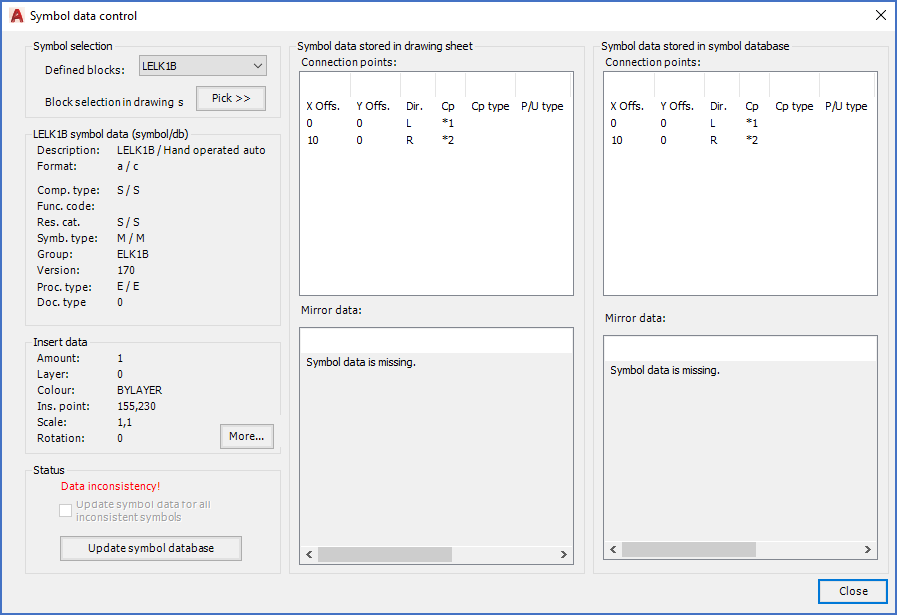
Figure 805: The "Symbol data control..." main dialogue
As you can see in the figure above, the dialogue is divided in six sections and a Close button. You will find detailed descriptions of them in the sub-topics that are listed below.
•Symbol data stored in drawing sheet
•Symbol data stored in symbol database