|
<< Click to Display Table of Contents >> Symbol data (symbol/db) |
  
|
|
<< Click to Display Table of Contents >> Symbol data (symbol/db) |
|
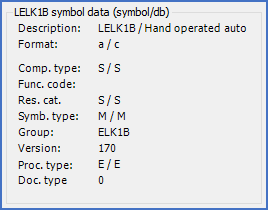
Figure 807: The "Symbol data (symbol/db)" section
In the symbol data (symbol/db) section, which is shown in the figure above, general symbol information is presented. To the left of a slash, you will find information stored in the symbol. To the right of the same slash, the corresponding information from the symbol database is presented. The information that is listed that way is described by the table below.
Field |
Explanation |
|---|---|
Description: |
The Description text is used to identify the symbol in the Symbol Insert Tool, where it is presented together with an image of the symbol itself. The search feature in the Symbol Insert Tool can search both in symbol names and in descriptions.
|
Format: |
The data Format is a letter defining the format of the symbol database data that is stored hidden in the symbol itself, as a backup. When new functionality has been introduced, the format has changed to accommodate that. The format version is denoted with a lower case letter, currently a - c, but additional versions may be added in the future.
|
Comp. type: |
The Component type letter code is the letter or combination of letters that is used to create a default item designation when inserting new main symbols and automatic item designation generation is active. (Typically for example "F" for a fuse, where the default item designation may become "-F1").
|
Func. code |
The Function code (ART) is used to identify the function of help symbols, mainly to control mirror booking. For contacts, two typical examples are "S" for make contacts, and "O" for break contacts.
|
Res. cat. |
The Resource category is where the symbol will be presented in the Symbol Insert Tool.
|
Symb. type |
Mainly, there are 14 standard symbol types available, like conventional main and help symbols, terminal main symbols, PLC help and mirror symbols and so on.
|
Group |
The symbol Group is used to keep different versions of the same symbol together, like for instance a vertical and a horizontal version of the same symbol.
|
Version |
The symbol Version specifies what may be regarded as an extended orientation of a symbol, like vertical or horizontal, directed up, down, left, or right, mirrored or not mirrored.
|
Proc. type |
The Processing type specifies whether a symbol should be processed by the OnLine Engine or not.
|
Doc. type |
The Document type is used to separate symbols aimed at different document kinds, like circuit diagrams, cabinet layouts, or external connection diagrams.
|
For more information about the symbol data, please refer to the Symbol Generator topic, and more specifically to the Object data sub-topic.