|
<< Click to Display Table of Contents >> Selection of objects to import, part 1 |
  
|
|
<< Click to Display Table of Contents >> Selection of objects to import, part 1 |
|
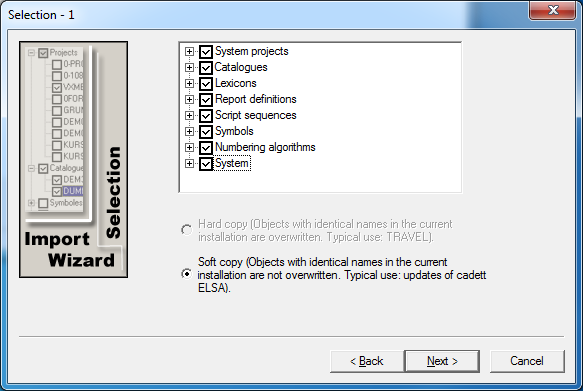
Figure 153: In this dialogue, you select what to import and if the import should be hard or soft.
Typically you select all objects and Soft copy.
You will be presented a dialogue as shown in the figure above, where you can select the objects to import and whether the import should be hard or soft. Hard import is available in cadett ELSA Enterprise only and is not intended or useful for updates. Therefore, please select Soft copy.
When the selection of objects to import is concerned, that selection is made from the objects that are available in the installation of cadett ELSA that you have specified to import from. You make these selections simply by checking the squares beside the objects that you want to import.
Each type of object can be selected in more detail before import. When it comes to for example symbols, you can select exactly which symbol libraries you would like to import. In each symbol library it is possible to specify exactly which symbols to import. When it comes to catalogues, you can select which catalogues to import. You can refine your selection in this way with all types of objects.
A detailed description of the refined selection possibilities is found in a topic named exactly that - Detailed description of refined selections.
In an update situation, you typically select everything – or almost everything – with the only exception being objects that you specifically would like not to import for one reason or the other.
When you have made your selections, you proceed by clicking the Next > button.
Please refer to the next topic, which is listed below, for a description of what comes next.
•Selection of objects to import, part 2