|
<< Click to Display Table of Contents >> Mirror data |
  
|
|
<< Click to Display Table of Contents >> Mirror data |
|
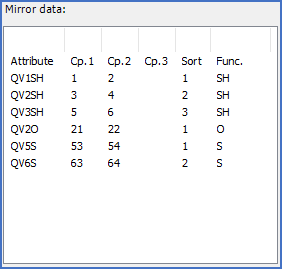
Figure 814: "Mirror data" for a fixed contact mirror with six contacts
For a contact mirror, each line in the presentation corresponds to a contact, as shown in the figure above. Each contact may have two or three connection point numbers. Each contact has a function code, which defines what kind of contact we are talking about, like "S" for make contact. Each contact also has a cross-reference attribute in which the cross-reference to the corresponding help symbol will be found. The name of that attribute is displayed in the first column.
Cable mirrors work in the same way, but each line corresponds to a cable core, and only one "connection point number" is defined for each cable core. That is of course not really a connection point number, but instead a "cable core number".
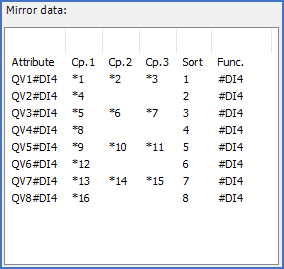
Figure 815: "Mirror data" for a PLC mirror with four digital inputs with four connection points each
PLC mirrors are somewhat different since there may be more than three connection points for each I/O. The figure above is an example of that. When the number of connection points for an I/O is 4 - 6, two lines are used. When the you have 7 - 9 connection points, three lines are used, and so on. In the figure above, the function code is #DI4 for all I/O's, which clearly indicates that we are dealing with digital inputs with four connections points per I/O. Therefore, each I/O is represented by two lines in the presentation.
Please refer to the table below for detailed explanations of all columns in the presentation.
Column |
Explanation |
|---|---|
Attribute |
Name of the cross-reference attribute associated with the function in question
|
Cp. 1 |
For fixed mirror symbols, like in the first figure above, the fixed connection point number for the first connection point is stated here.
For dynamic mirror symbols, meaning where the connection point numbers may be edited by the user since they are stored in attributes, a reference to a KNR attribute is stated here. *1 refers to KNR2, *2 refers to KNR2, and so on.
Please note, that for PLC mirrors with more than three connection points per I/O, this field will be used also for connection points 4, 7, and 10, in additional lines for the same I/O.
|
Cp. 2 |
For fixed mirror symbols, like in the first figure above, the fixed connection point number for the second connection point is stated here. For dynamic mirror symbols, meaning where the connection point numbers may be edited by the user since they are stored in attributes, a reference to a KNR attribute is stated here. *1 refers to KNR2, *2 refers to KNR2, and so on.
If there is no second connection point, like in a cable mirror, this field is empty. Please note, that for PLC mirrors with more than three connection points per I/O, this field will be used also for connection points 5, 8, and 11, in additional lines for the same I/O.
|
Cp. 3 |
For fixed mirror symbols, like in the first figure above, the fixed connection point number for the third connection point is stated here. For dynamic mirror symbols, meaning where the connection point numbers may be edited by the user since they are stored in attributes, a reference to a KNR attribute is stated here. *1 refers to KNR2, *2 refers to KNR2, and so on.
If there is no third connection point, like for an ordinary make contact, this field is empty. Please note, that for PLC mirrors with more than three connection points per I/O, this field will be used also for connection points 6, 9, and 12, in additional lines for the same I/O.
|
Sort |
This field contains an integer which specifies the sorting order within the current function code, meaning that the sequence in which the contacts, cable cores, or I/O's should be booked, is defined here.
|
Func. |
The function code of the current function, like type of contact, or type of I/O.
|
For a more detailed explanation of the terms that are discussed in the table above, please refer to the Symbol Generator topic,, and more specifically to the Content of SYMBDEFC.DBF sub-topic.