|
<< Click to Display Table of Contents >> Connection points |
  
|
|
<< Click to Display Table of Contents >> Connection points |
|
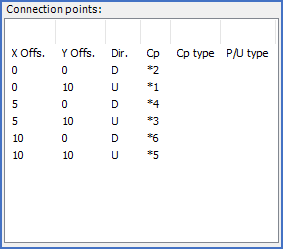
Figure 813: The "Connection points" section
Each line in the presentation corresponds to a connection point.
Please refer to the table below for detailed explanations of the columns and their content.
Column |
Explanation |
|---|---|
X Offs. |
Position of the connection point relative to the insertion point in x direction
|
Y Offs. |
Position of the connection point relative to the insertion point in y direction
|
Dir. |
Direction of the connection point: |
Cp. |
This field contains a fixed connection point number or a reference to a KNR attribute. In the latter case, *n refers to a connection point number that should be read from the KNRn attribute.
|
Cp type |
Type of connection:
|
P/U type |
Terminal/connector type:
" " = Not terminal or connector (typically a device)
|