|
<< Click to Display Table of Contents >> Using an Alias for multi-terminals |
  
|
|
<< Click to Display Table of Contents >> Using an Alias for multi-terminals |
|
To use an Alias, please start by invoking the Multi-terminal macro from the a - Terminals Resource category in the Symbol Insert Tool.
The following prompt is then displayed at the command line:
Select function Select/Alias/Insert/<eXit>: S
Enter S for Select.
The interaction that is shown below will then take place on the command line.
Select from Definitions/<Alias>: <RETURN>
Above you see how the Alias option, which is default, is selected by pressing the <RETURN> key. The currently available Alias definitions are then listed, as in the example shown below, and you can make your selection by entering the number that is associated with the Alias that you want to use.
1. -X5 (My own multi-terminal definition no. 1)
2. -X6 (My own multi-terminal definition no. 2)
Select 1 - 2: 1
The selected Alias is displayed as shown below.
-X5 (My own multi-terminal definition no. 1)
Select function Select/Alias/Insert/<eXit>: I
When the correct Alias definition is displayed, you can select the Insert option by entering an I, as shown above.
Then, you can continue with the standard procedure for terminal insertion, as shown below.
First conductor (point uppermost or leftmost): <left_click>
Last conductor (point): <left_click>
External side (point): <left_click>
Terminal group name from 2nd symbol on Invisible/<None>: <RETURN>
First terminal number <1>: 10
Interval <1>: <RETURN>
(Enter Index, Terminal group name, Terminal number, Location and Plant/function.) <ENTERED IN DIALOGUE BOX>
Terminal number <11>: <RETURN>
Terminal number <12>: <RETURN>
Select function Select/Alias/Insert/<eXit>: <RETURN>
After all that, your multi-terminals are in place, as shown in the figure below.
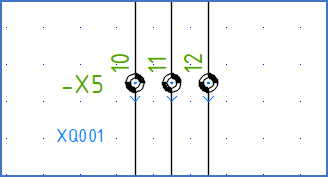
Figure 1628: The multi-terminals have been inserted using an "Alias" definition.