|
<< Click to Display Table of Contents >> Multi-terminals |
  
|
|
<< Click to Display Table of Contents >> Multi-terminals |
|
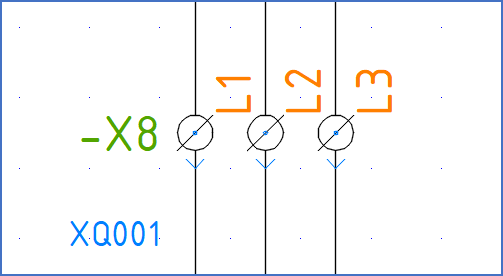
Figure 1614: An example of multi-terminals
The word "multi-terminal" refers to a special legacy feature in cadett ELSA that allows you to create user defined "terminal symbols", meaning terminals that have a user defined appearance and sometimes even a user-defined size.
Since this is a legacy feature, the user interface is quite primitive, but the multi-terminal functionality nevertheless allows for multi-terminal definitions to be created, maintained and used in a reasonably effective way.
Please refer to the sub-topics that are listed below for a complete description of the functionality as such, how multi-terminal definitions are created and maintained, and finally how you can use these definitions, in first hand how to insert multi-terminals into your circuit diagrams.
•Introduction to Multi-terminals