|
<< Click to Display Table of Contents >> Select product |
  
|
|
<< Click to Display Table of Contents >> Select product |
|
cadett ELSA comes with five different product levels: View, Start, Basic, Professional, and Enterprise.
For Basic, Professional and Enterprise there is also a Solo eXs alternative available. Solo eXs is an embedded AutoCAD OEM based CAD Engine that can be used instead of AutoCAD or AutoCAD Electrical. In total, you therefore have no less than eight alternatives.
You will now have to select one of them.
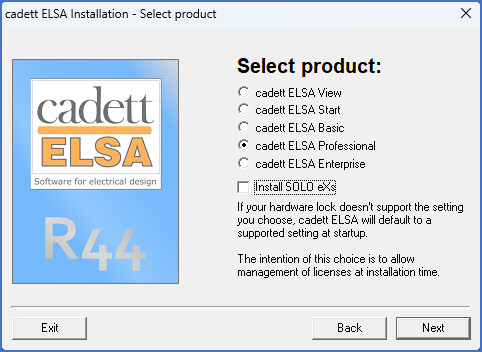
Figure 2331: Selection of product
The available alternatives are described by the table below.
Alternative |
Explanation |
|---|---|
cadett ELSA View |
The simplest alternative. View only. AutoCAD cannot be used.
|
cadett ELSA Start |
The simplest step-in design alternative. Single user only. AutoCAD is needed.
|
cadett ELSA Basic |
The standard Basic alternative. Multiuser network installations supported. AutoCAD is needed.
cadett ELSA Basic with Solo eXs is called cadett ELSA LT.
|
cadett ELSA Professional |
The most commonly used alternative. AutoCAD is needed.
cadett ELSA LT supplemented with cadett ELSA Professional Extension is called cadett ELSA Professional Solo.
|
cadett ELSA Enterprise |
The top-level product with additional functionality for large businesses like distributed workplaces, cloud usage, Super Project Report Generation and much more.
cadett ELSA LT supplemented with cadett ELSA Enterprise Extension is called cadett ELSA Enterprise Solo.
|
Install SOLO eXs |
The five alternatives described above are so-called “radio buttons”, meaning that if you select one of them, the previously selected one will be unselected. The Install SOLO eXs alternative is however separately selectable. That means that you can specify whether Solo eXs should be installed or not, regardless of which cadett ELSA product you have selected. Please note however, that you cannot use Solo eXs in combination with cadett ELSA View and Start.
|
Please note that if you would select for example the cadett ELSA Professional, even though you have only bought the cadett ELSA Basic, the program will start as a cadett ELSA Basic anyway. If you do not have a license support for the selection you have made, an automatic selection of the “best available” alternative will be made. The installation will run without errors, but you cannot start the program without a license!
Please also note that you can install Solo eXs even if you do not have a license for it. In that case, however, you will not be able to use it.
Select the correct product, click Next, and continue as described in the topic listed below.
•Possible problem when renaming existing directory