|
<< Click to Display Table of Contents >> Packing and sorting of contacts |
  
|
|
<< Click to Display Table of Contents >> Packing and sorting of contacts |
|
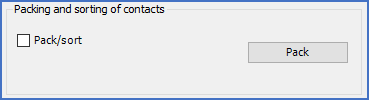
Figure 1100: The "Packing and sorting of contacts" section
The Packing and sorting of contacts section is displayed for contact mirrors and PLC mirrors only. For all other symbol types, it is not shown at all. This topic is therefore relevant only for the following two symbol types:
•03. Conventional contact mirror
•06. PLC mirror
In the Packing and sorting of contacts section, you will find a check-box named Pack/sort and and a button named Pack. With them, you can manage the Packing and sorting of contacts feature. What that feature can do, is to update the attribute names of the cross-reference attributes, the names of the connection point number attributes, and the sequence between the functions (contacts or I/O's), according to the following well-defined pattern:
•The functions (contacts or I/O's) are sorted according to:
oFirstly, the function code
oSecondly, the graphical placement, from above downwards, and from left to right.
•Cross-reference attributes are renamed according to the following pattern:
oQV<Running number><Function code>
oThe "Running number" starts with 1 and has a step value of 1. It is counted separately for each function code.
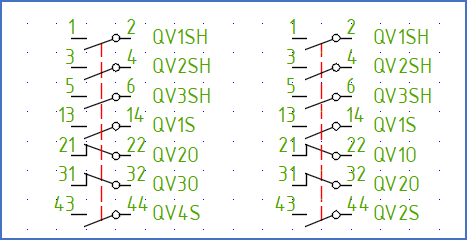
Figure 1101: Example where cross-reference attributes have been renamed. "Before" to the left. "After" to the right. Each function code gets its own number series.
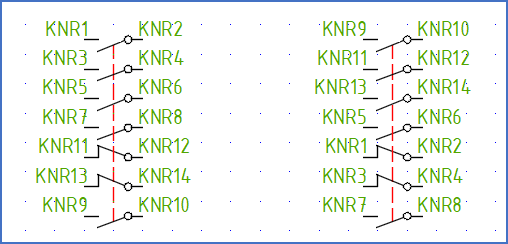
Figure 1102: Example where connection point number attributes have been renamed. "Before" to the left. "After" to the right. Function codes are sorted alphabetically (O, S, SH).
Please refer to the sub-topics that are listed below.
•Pack