|
<< Click to Display Table of Contents >> Symbol data dialogue (main Symbol Generator dialogue) |
  
|
|
<< Click to Display Table of Contents >> Symbol data dialogue (main Symbol Generator dialogue) |
|
The main dialogue box of the Symbol Generator is named Symbol data and is used to define most of the properties of a symbol, besides from the graphical appearance, which is defined with ordinary AutoCAD objects, like lines and circles. The Symbol data dialogue is displayed immediately when invoking the 1. New... command, and when double-clicking the Symbol Object, for example after invoking the 3. Edit command.
Below, the Symbol data dialogue is described with all its details.
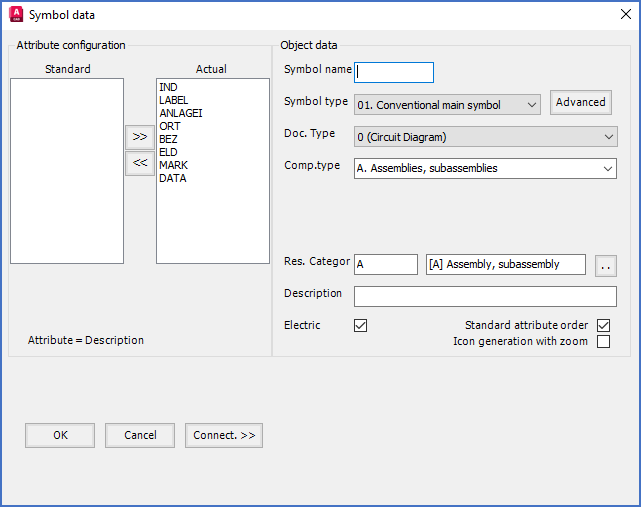
Figure 1070: The "Symbol Generator Main Dialogue" or in other words, the "Symbol data" dialogue
The detailed description of the Symbol data dialogue is divided in the following sub-topics covering the respective sections of the dialogue itself:
•OK
For mirror symbols, the Symbol data dialogue is somewhat different and looks like shown in the figure below.
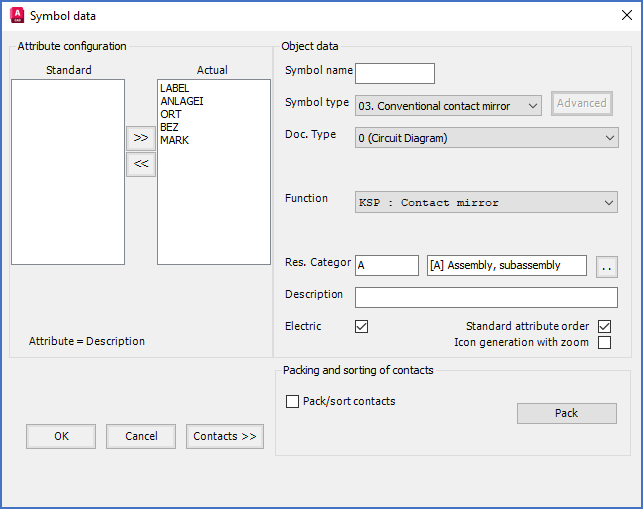
Figure 1071: The "Symbol data" dialogue for a mirror symbol
The Connect.>> button is replaced with a Contacts >> button, and an additional Packing and sorting of contacts section is added. Please refer to the subtopics listed below for further explanations of them.
•Packing and sorting of contacts