|
<< Click to Display Table of Contents >> Main directory of cadett ELSA |
  
|
|
<< Click to Display Table of Contents >> Main directory of cadett ELSA |
|
Here, you specify the main directory of cadett ELSA, which means the directory where the software should be placed.
Figure 2326: Specification of the main directory of cadett ELSA
You can specify the directory name freely, with the following restrictions:
•The directory must be located in the root of a local drive (for example: C: or D:).
•The directory name must follow the DOS83-convention, which means that it cannot contain more than 8 characters, no spaces and it may only contain the characters A-Z, 0-9, _ and -.
The directory name ELSA is strongly recommended. Rarely – if ever – is there a reason not to use that name.
If you are updating an existing installation of cadett ELSA by installing it in the same directory as the old version, please make sure to select the directory, not typing it. By doing so, you ensure that you are really using the existing directory, which is important to simplify the update procedure.
If the directory that you specify, either by selecting it or by typing it, in fact does exist, a warning will be issued, as shown in the figure below.
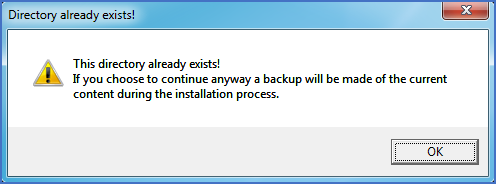
Figure 2327: Warning issued if the specified main directory already exists
If you are updating an existing installation, this is perfectly normal.
The text informs you that the main directory of the old installation will be renamed to create a backup, so that the new installation can be placed in a new directory with the same name as was used for the main directory of the old installation.
Please continue with the installation, as described in the topic listed below.