|
<< Click to Display Table of Contents >> Free space warning |
  
|
|
<< Click to Display Table of Contents >> Free space warning |
|
To make a local installation of cadett ELSA, you need approximately 15 GB of free disk space, at the time when the cadett ELSA main directory is created. The installation file itself is rather big, a couple to a few GB. The unpacked version of the installation file has a similar size. A few GB of disk space will therefore be consumed before the actual installation starts, raising the need of free disk space before you copy the installation file to your computer to about 15 - 20 GB.
If the amount of free disk space is not sufficient, you will get an error message as shown in the figure below.
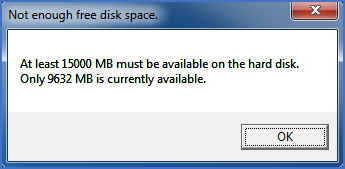
Figure 2328: More disk space is needed for the installation.
You can take measures to fix this problem directly and then continue the installation. You do not need to restart the installation.
One simple action that can save you approximately a couple GB is to delete the original installation file. Since it has already been unpacked, it is no longer needed. Please do not forget to empty the Recycle Bin afterwards. Otherwise, you will not save any disk space at all!
The next step of the installation is described in the topic that is listed below.