|
<< Click to Display Table of Contents >> I/O's, help symbols |
  
|
|
<< Click to Display Table of Contents >> I/O's, help symbols |
|
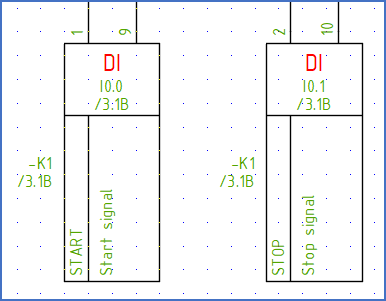
Figure 1700: Two I/O symbols for digital inputs with two connection points each
In each I/O symbol (help symbol), the following information may be present in attributes:
•Item designation information (function/plant, location, product/circuit, designation)
•Connection point numbers
•I/O number (physical address)
•Symbolic address
•Remarks/comments (up to 7 lines)
The item designation information is identical for all symbols belonging to the same PLC. Other information – connection point numbers, I/O numbers, symbolic address, and remarks – are individual for each I/O.
Each I/O has a function code which defines the of I/O. The table below describes the options which are initially available (additional ones may be added when needed).
Function code |
Digital or analogue |
Input or output |
Connection points per I/O |
|---|---|---|---|
#DI1 |
Digital |
Input |
1 |
#DI2 |
2 |
||
#DI3 |
3 |
||
#DI4 |
4 |
||
#DO1 |
Digital |
Output |
1 |
#DO2 |
2 |
||
#DO3 |
3 |
||
#DO4 |
4 |
||
#AI1 |
Analogue |
Input |
1 |
#AI2 |
2 |
||
#AI3 |
3 |
||
#AI4 |
4 |
||
#AI5 |
5 |
||
#AI6 |
6 |
||
#AI7 |
7 |
||
#AI8 |
8 |
||
#AI9 |
9 |
||
#AI10 |
10 |
||
#AI11 |
11 |
||
#AI12 |
12 |
||
#AO1 |
Analogue |
Output |
1 |
#AO2 |
2 |
||
#AO3 |
3 |
||
#AO4 |
4 |
||
#AO5 |
5 |
||
#AO6 |
6 |
||
#AO7 |
7 |
||
#AO8 |
8 |
||
#AO9 |
9 |
||
#AO10 |
10 |
||
#AO11 |
11 |
||
#AO12 |
12 |
||