|
<< Click to Display Table of Contents >> Workstation installation |
  
|
|
<< Click to Display Table of Contents >> Workstation installation |
|
cadett ELSA consists of a central installation and a workstation connected to that central installation. In a multiuser network installation, the central installation is located on a server, while the workstation is located on a workstation computer. In a local installation, both the central installation and the workstation are located on the same computer. They will however reside in separate directories. Typically, the central installation might be placed in C:\ELSA, while the workstation might be found in C:\ELSAWS0.
If you are making a local installation of cadett ELSA on a “clean” computer, without any current cadett ELSA installation, the workstation will be created as the final part of the installation process.
If you are instead updating an existing local installation by installing "over the old installation", the workstation is already installed, so this step of the installation is skipped. In that case, you can go directly to The installation is completed topic.
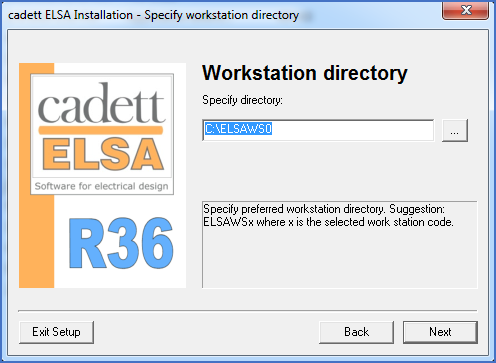
Figure 2334: Specification of the workstation directory
In the case of a new local installation, you will have to specify where the workstation directory should be placed and what name it should have. That is done in a dialogue like the one shown in the figure above. Keeping the default workstation directory name C:\ELSAWS0 is strongly recommended.
After specifying the workstation directory, please click Next to continue the installation.
Files will then be copied to the workstation directory and the drivers for a possible local hardware lock will once again be addressed. Since they are already installed, the procedure will however run much faster than was the case when they were first installed, moments earlier.
The next step is described in the topic listed below.