|
<< Click to Display Table of Contents >> Terminal/connector help symbol |
  
|
|
<< Click to Display Table of Contents >> Terminal/connector help symbol |
|
A help symbol for terminals and/or connectors may be useful in many cases. A help symbol is of course designed to refer to a specific main symbol. The main symbols for both terminals and connectors are defined per terminal, pin, socket or pin/socket. The distinction when it comes to what constitutes a device varies between terminals and connectors, but that is a question without relevance here.
To get an unambiguous reference, both the terminal group name and the terminal number must be part of both the main and the help symbol, and they must both match. In that way, it is possible to have one or many help symbols for each terminal symbol.
In exactly the same way, both the item designation of a connector (the connector name) and the pin/socket number must be defined in both main symbol and help symbol to get an unambiguous reference.
There is no difference between terminal and connector help symbols. They are defined in the same way.
Terminal help symbols are used by the standard External Connection Diagram feature. Those help symbols automatically get cross-references to the corresponding terminals, and those cross-references are of course automatically updated OnLine whenever changes are made to the circuit diagrams that make such updates called for.
A terminal/connector help symbol is characterised by the following properties:
•The Symbol type is 09. Terminal/connector help symbol.
•It has a terminal group name or connector name defined primarily by a BEZ attribute in possible combination with ORT, ANLAGEI, CIRCUIT, and FUNKTION.
•It has a terminal number or pin/socket number defined by a BEZ1 attribute.
•It is also possible to omit the BEZ1 attribute and to specify the terminal number directly in the BEZ attribute (for example -X1:1), but that is most cases, that is not recommended.
•The Function code may be selected arbitrarily.
Below is an example of a standard Terminal/connector help symbol from an External Connection Diagram during editing. It is not explicitly shown here, but we can imagine that it will be used as a starting point for a completely different use case.
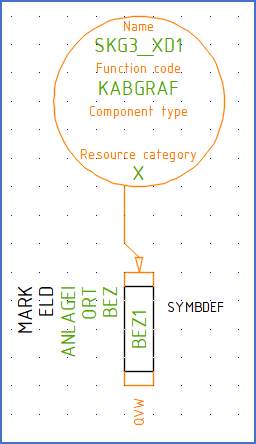
Figure 1225: A terminal/connector help symbol under edting
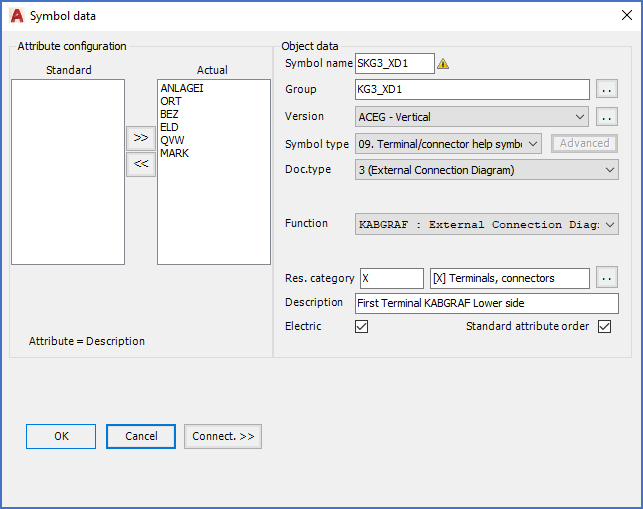
Figure 1226: A terminal/connector help symbol under editing