|
<< Click to Display Table of Contents >> Pin/socket main symbol |
  
|
|
<< Click to Display Table of Contents >> Pin/socket main symbol |
|
Symbols for connectors are typically inserted using standard macros activated from the Symbol Insert Tool, more specifically in the a - Terminals resource category, where you find three macros for the purpose:
•Only pin
•Only socket
•Pin and socket combined
It is possible to create similar user defined symbols, either to replace the standard symbols or to use in parallel.
It is possible to reconfigure the standard macros so that they use user defined symbols instead of the standard ones. That is done in the ACAD.INI configuration file which is found in the current symbol library.
The relevant section looks similar to what is presented below. The symbol names below are the standard ones in the IEC1082 symbol library.
[Connectors]
;
; Symbol configuration for connectors. The variable names relates
; to line orientation and the relative order of the connecting line
; and the symbol (or type of symbol) when reading the drawing
; in top left to bottom right order.
;
; Pin and socket combined
HorJackPlug=LNKONT
HorPlugJack=LRKONT
VerJackPlug=SNKONT
VerPlugJack=SRKONT
;
; Only pin
HorLinePlug=LNKONT1
HorPlugLine=LRKONT1
VerLinePlug=SNKONT1
VerPlugLine=SRKONT1
;
; Only socket
HorLineJack=LNKONT2
HorJackLine=LRKONT2
VerLineJack=SNKONT2
VerJackLine=SRKONT2
;
A connector symbol is characterised by the following properties:
•The Symbol type is 08. Pin/socket main symbol.
•The Function code is STK: Connector.
•The Contact type is either Pin or Socket
The Symbol generator does currently not directly support creating combined symbols with two connection points, one pin and one socket.
Symbols for either pins or sockets may however be easily created with the Symbol generator. A typical example is shown below, where a user defined socket symbol is in the process of being created started from a copy of the corresponding standard symbol.
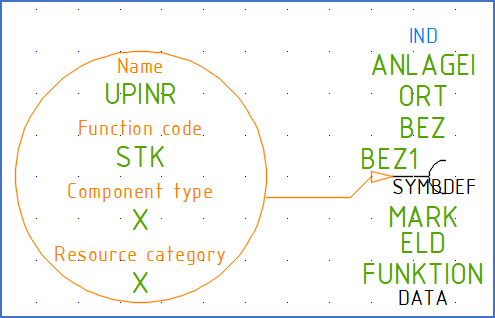
Figure 1223: A user defined plug symbol in the making
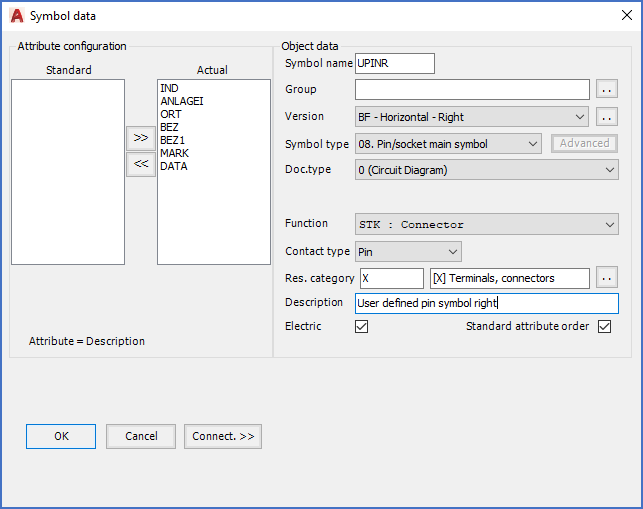
Figure 1224: The "Symbol data" dialogue corresponding to the symbol shown in the figure above