|
<< Click to Display Table of Contents >> Use |
  
|
|
<< Click to Display Table of Contents >> Use |
|
From the workstation a program called ServerAdmin.exe can be started for example by double-clicking the EXE file. It is of course also possible to create a shortcut for this program if you prefer that.
ServerAdmin.exe is located in the cadett ELSA main directory.
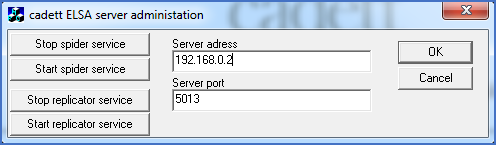
Figure 2262: The dialogue box of the Service Management Feature
A dialogue is presented where you have a number of options.
First of all it is possible to specify the IP address of the server and the port that is used to communicate with the cadett service.
Provided that those two settings have been correctly made you can use the feature with four buttons at your disposal.
Button |
Result |
|---|---|
Stop spider service |
The Spider service is stopped. |
Start spider service |
The Spider service is started. |
Stop replicator service |
The Replicator service is stopped. |
Start replicator service |
The Replicator service is started. |
To restart one of the services, please first stop it, and then start it again.