|
<< Click to Display Table of Contents >> Script Sequences |
  
|
|
<< Click to Display Table of Contents >> Script Sequences |
|
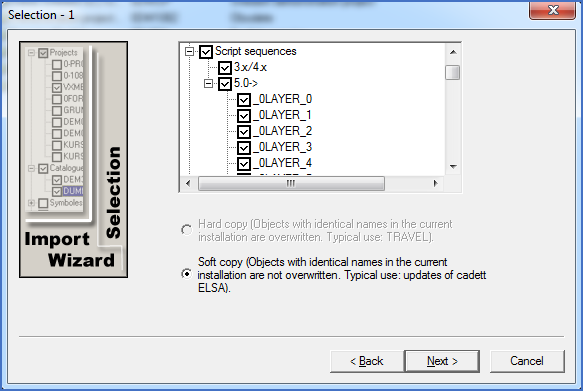
Figure 2548: Selection of Script sequences to import
The Script Sequences are divided in two subgroups:
•Script Sequences from cadett ELSA 4.15 and earlier, early revisions of cadett ELSA 5.0 and MG-CAD 4.2 and earlier versions.
•Script Sequences in the contemporary format, which has been in use from late revisions of cadett ELSA 5.0, cadett ELSA 5.5 and later, and in MG-CAD 2000.
When importing the older type of Script Sequences, you select all or none. (You can handle them individually later in the Script Generator).
When importing Script Sequences of the current type, you have the possibility to specify which Script Sequences to import individually. The Script Sequences are listed with their Script Sequence names. If you move the mouse pointer over them, the description will show up as a tool-tip.
The import of contemporary Script Sequences (ESC files) is performed by copying the ESC files “soft” to the receiving installation. An automatic collect is made the first time the Script Generator is started after the import. Since file names and Script Sequence names do not have to be equal, there is a possibility for a situation with several ESC files defining Script Sequences with the same Script Sequence name. This conflict is detected during the collect, whereby an error message is displayed and the user is asked to decide how to resolve the naming conflict, for example by renaming one of the Script Sequences or by deleting one of them.