|
<< Click to Display Table of Contents >> PLC symbols |
  
|
|
<< Click to Display Table of Contents >> PLC symbols |
|
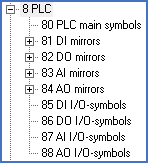
Figure 1702: The main sub-categories of resource category 8
An extensive set of general standard PLC symbols that covers almost all PLC systems that are currently available on the market is included in cadett ELSA at delivery.
If you despite that would like to create your own PLC symbols, that is also easy to do. Possible reasons for doing that could be a wish to adapt symbols for specific products to reduce the amount of editing needed, or a wish to create an appearance that suits your own preferences better, for example if you would like smaller simplified I/O symbols, or perhaps bigger more detailed ones.
User defined PLC symbols are created using the Symbol Generator. The assistance that the Symbol Generator provides in this context is more extensive than in other situations, like for conventional symbols.
A PLC main symbol is created in exactly the same way as a conventional main symbol. Nothing special or unusual apply, apart from the fact that the symbol should be defined as a PLC main symbol. Please note that the component type letter code for PLC’s according to IEC750 is D while it is K according to IEC1346.
PLC help symbols for digital inputs or outputs normally have 1, 2, 3, or 4 connection points. PLC help symbols for analogue inputs or outputs may have any number of connection points between 1 and 12. A larger number of connection points than so is also supported, but requires the definition of additional function codes.
The function code that should be used depends on the number of connections. Please check carefully that the actual number of connection points is equal to what the current function code specifies.
PLC mirrors are relatively complex symbols with a large number of attributes. The Symbol Generator can assist with simple graphics if you like. Default values for connection point numbers or I/O numbers are easy to specify as default attribute values.
To make it possible for a PLC help symbol to connect to an I/O in a PLC mirror, the function code must be identical. It is allowed to mix different function codes within one single PLC mirror, meaning that different kinds of I/O’s may exist in the same mirror.