|
<< Click to Display Table of Contents >> Lexicons |
  
|
|
<< Click to Display Table of Contents >> Lexicons |
|
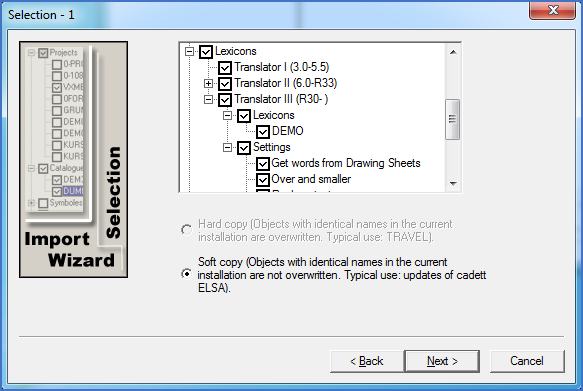
Figure 2546: Selection of which Lexicons and Settings to import
In cadett ELSA 5.5 and earlier and in MG-CAD 4.2 and earlier, there was one and only one lexicon (AUTODIC). It was limited to five languages. In the first subgroup, you will find this older type of lexicon. This was the Translator I, the first translator generation.
Starting with the release of cadett ELSA 6.0 and MG-CAD 2000, a new type of lexicon structure was introduced with the second translator generation, called Translator II. With that structure, each cadett ELSA installation can contain an unlimited number of lexicons, and up to 20 languages can be used in each lexicon. The second subgroup comprises those lexicons.
The current translator belongs to the third generation, which was originally released in cadett ELSA R30. It is therefore named Translator III. The lexicons of Translator III share many properties with the ones from Translator II, like the fact that there might be an unlimited number of them and that each one may contain up to 20 languages. One important difference though, is that Translator III supports Unicode, meaning alternative character sets, like Russian or Chinese.
Translator III definitions of how to make translations, called Translator Settings, can also be imported.
The Translator I and II are no longer available in cadett ELSA. Therefore, it is not possible to use those lexicons directly, even if it is in fact possible to import them. It is however possible to convert old lexicons to new ones using an import feature available directly in Translator III (the Module pull-down menu). That is what makes importing old style lexicons meaningful.
For Translator II lexicons, the import is made softly word by word when applicable. Hence, if a specific Translator II lexicon is found in both the old and the new installation, the import will be made on a word-by-word basis. This import is “soft”, meaning that only words that do not exist in the new lexicon that will be imported from the old lexicon. The key language is LANGUAGE01, which means the second language. In the LEXICON case – the demo-example that is included in the standard installation – this is Swedish.
For Translator III Lexicons, the import at an update situation (soft import) is made soft by lexicon as a whole. No mixing of words from one lexicon with another is made. Therefore, additions or alterations made to the DEMO lexicon in the old version will not be imported, but any user-defined lexicons will be imported as they are.
The principle for Translator III Settings is identical. Any changes made to standard settings will be lost, but all user defined settings will be imported as they are, completely unchanged.