|
<< Click to Display Table of Contents >> Start the import |
  
|
|
<< Click to Display Table of Contents >> Start the import |
|
If you have a local installation of cadett ELSA, you begin by starting it.
If you have a network installation, you first have to check that no other workstation is running cadett ELSA. In other words, you have to be the sole user of cadett ELSA when you are running the import function. Then you start your cadett ELSA.
Please note however that running the import from a workstation in a network is rather slow if the amount of data to import is big. If the number of projects is in the thousands, it might be wise to consider using a workstation directly on the server, a method that will speed up the import process by a typical factor of at least 10.
If you have just installed “on top of” an old installation with the same directory name as the old installation was using, the import function will launch automatically. If not, you have to start it manually. In the latter case, please select the function Import from other cadett ELSA… in the Tools pull-down menu, as shown in the figure below.
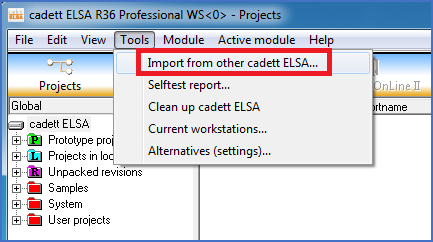
Figure 2537: Manual start of the "Import from other cadett ELSA..." feature.
The next step after starting the import feature is described in the next topic, which is listed below.