|
<< Click to Display Table of Contents >> Plot symbol library… |
  
|
|
<< Click to Display Table of Contents >> Plot symbol library… |
|
The Plot symbol library... command is used to create a nice-looking documentation of primarily user defined symbols. It can however plot any symbols in the same way, user defined or not.
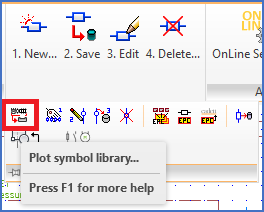
Figure 797: The "Plot symbol library..." command
The command is found in the Symbol slide-out panel of the Tools panel in the ribbon menu, as shown in the figure above.
If you want to type the command, instead of selecting it in the menu, the name of it is CAELSYMBPLOT.