|
<< Click to Display Table of Contents >> Installation of neutral workstation |
  
|
|
<< Click to Display Table of Contents >> Installation of neutral workstation |
|
A so-called "neutral cadett ELSA workstation" is installed. The neutral workstation installation will make all necessary registrations needed to run cadett ELSA. When a user starts cadett ELSA for the first time, a workstation directory is automatically created with the necessary settings.
When applicable (in medium and large thin client solutions), a drive letter is first mapped to the cadett ELSA server (for example X:). If you are preparing a small thin client solution, no drive mapping will be needed, since a suitable substitute will already be in place.
Thereafter, the installation program is started:
X:\ELSA\INSTALLER\SETUP.EXE
Depending on current security policies, an elevation to administrator might occur. In any case, the installation of the neutral workstation requires administrative privileges.

Figure 2403: The installation program has started. The cadett ELSA version number will of course differ from this figure, but the procedure will be the same.
As shown in the figure above, the installation program presents itself. Please continue by clicking Next, and then select a suitable language for the installation process, as shown in the figure below.

Figure 2404: A suitable language for the installation process is selected.
After you have selected the language for the installation, you must decide which type of installation to perform. If everything done prior to the current operation has been done correctly, only one option should be available, as shown in the figure below.

Figure 2405: Installing a neutral workstation is the only available option. If that option is not available, the settings in "DYN_WS.INI" are probably incorrect.
If the Neutral workstation for thin clients option is not available, something is wrong. You then need to correct the problem before proceeding. The most likely error in that case, is a problem with the configuration file DYN_WS.INI. Please refer the cadett ELSA server topic if you have ran into that situation.

Figure 2406: The main directory of cadett ELSA is selected.
The next step is to identify the main directory of cadett ELSA, as shown above in the figure above. After you have done that, the installation will run for a little while, as shown below in the figure below.

Figure 2407: The installation procedure is running.
In the end of the installation process, drivers for hardware lock communication are installed, as shown in the figure below.
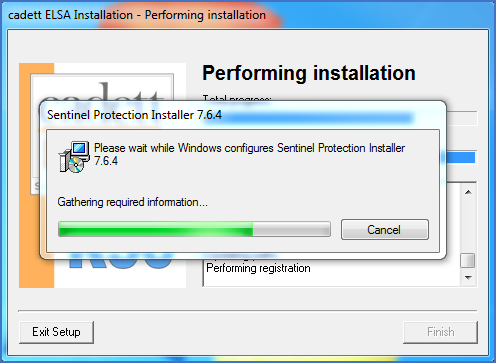
Figure 2408: In the end of the installation process, the hardware lock driver is installed.
When everything is in place, the dialogue that is shown below in the figure below informs you that the installation is ready.
Figure 2409: The installation is complete.
Please click Finish and then continue to test the installation.