|
<< Click to Display Table of Contents >> Important performance issue |
  
|
|
<< Click to Display Table of Contents >> Important performance issue |
|
When the installation is finished, you will start cadett ELSA. When doing so, an import of user data from the renamed old installation will automatically start. In local installations, there are no further considerations to make because of that. In network installations there however are.
The obvious way of starting cadett ELSA after the installation is to start one of the existing ordinary workstations. That will work fine, but there is a disadvantage with doing so, since the first workstation to start is the one to run the import. If an ordinary workstation is used for the import, the import will be made over the network, which unfortunately can be very time-consuming, especially if the amount of projects is large. It is not uncommon with an import taking many hours to perform when thousands of projects are imported. An easy way of speeding this process up with a typical factor of at least 10, is to run the import directly on the server. To be able to do that a workstation must be created directly on the server so that cadett ELSA can be started there.
•If you are using a network hardware lock, or a software based license server, cadett ELSA can easily use a license from one of those.
•If you are using local hardware locks for your workstations, it is not as easy to transfer a license to the server. You might disconnect a hardware lock from one of the workstations and connect it directly to the server, but in many cases that is practically difficult, especially if you are using a virtual server.
It has therefore been made possible to run cadett ELSA on the server in a limited mode, where no hardware lock is needed. That limited mode enables you to do one thing only, namely to perform the import. All other features are disabled. To start cadett ELSA in the import only mode, please manually adjust the shortcut on the desktop to add a switch called “/Import”, like shown in the figure below. Please note that the switch is case sensitive.
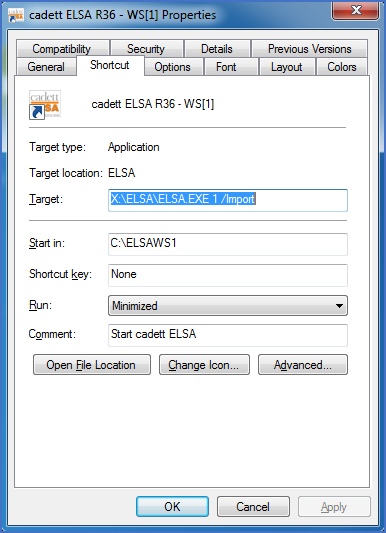
Figure 2419: Shortcut modified to start cadett ELSA in import only mode
cadett ELSA in the extremely limited import only mode is shown in the figure below.
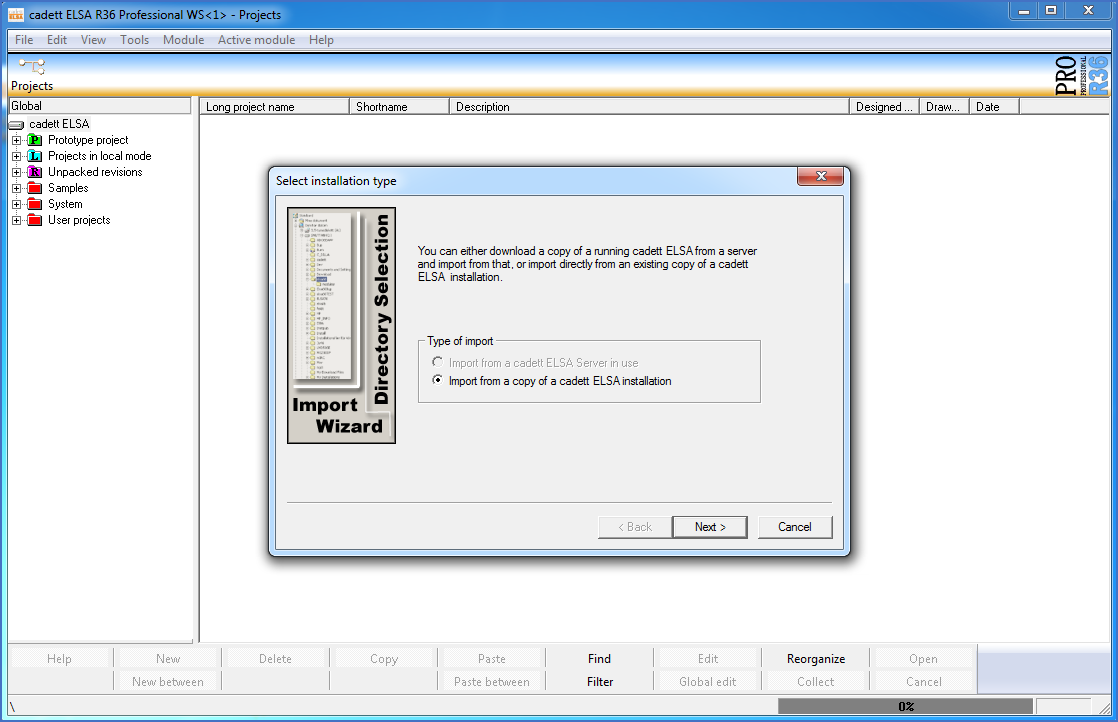
Figure 2420: cadett ELSA in the limited import only mode