|
<< Click to Display Table of Contents >> The differences for a horizontal contact mirror |
  
|
|
<< Click to Display Table of Contents >> The differences for a horizontal contact mirror |
|
The same principle that is described for vertical contact mirrors can of course be used for a horizontal contact mirror as well. The description below focuses on the differences from a vertical contact mirror.
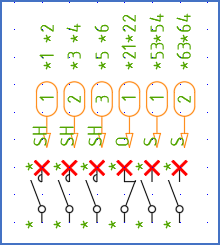
Figure 1188: The insertion points for the contacts are shown with red crosses in this figure.
The contacts are inserted with the insertion points in a similar way as for the vertical case. Please refer to the figure above.
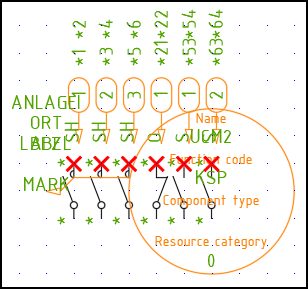
Figure 1189: This is how messy it might look directly after specifying the insertion point. Some adjustments are necessary.
The insertion point is placed 5 mm to the left of the leftmost contact, as shown in the figure above. The result is even messier than the vertical case. By following the steps outlined below systematically, you will however be able to deal with that successfully.
First, you can rotate the Symbol object.
Then you can adjust the attributes. For a horizontal contact mirror, its is not enough to move the attributes. You must change the text justification as well. As you can see in the figures above and below, it must be changed from Centre to Left. The Attribute adjustment tool is perfect for that job.
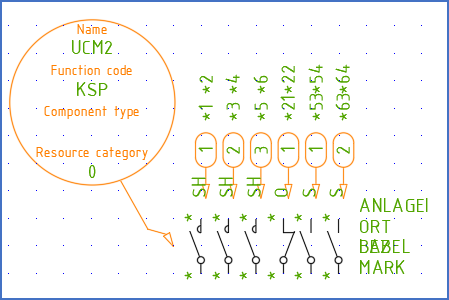
Figure 1190: The symbol object has been rotated, and the attributes have been adjusted, both for position and text justification.
Then add the mechanical link, save the symbol, and test it.
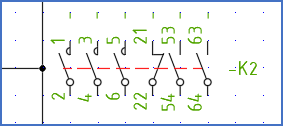
Figure 1191: The horizontal version of the contact mirror is ready.
The figure above shows the ready-to-use contact mirror.