|
<< Click to Display Table of Contents >> Potential reference |
  
|
|
<< Click to Display Table of Contents >> Potential reference |
|
There may be one of two reasons for creating a user defined potential reference symbol:
•You may be basically satisfied with the non-graphical potential reference symbols that are typically used in cadett ELSA and which comply with the IEC standard, but need some additional attributes or some modifications of the standard attributes, for one reason or the other.
•You may want to create a completely different potential reference symbol, perhaps with some graphics, like an arrow, a balloon or other kind of graphical elements.
In the former case, you can create a user defined variant of the standard LPOTR symbol, and reconfigure the potential reference macro to use your own symbol instead of the standard one. In that case, you insert the standard LPOTR symbol manually with the INSERT command. You edit the symbol with the Symbol generator: 2. Edit command. You change the name and make any other modifications that you need. You save the new symbol with the Symbol generator: 3. Save command. Finally, you reconfigure the macro by editing the MAC03.INI configuration file, which you will find in the current symbol library. After those operations, you continue using the standard potential reference macro, which will then use your own symbol.
In the latter case with graphics, you might need to create multiple symbols, perhaps one to place on the left, and a second one to place on the right. If you have a need for potential references on vertical lines as well, two additional symbols might be needed for up and down, giving a total of four symbols. In this case, you will have to insert these symbols from the Symbol Insert Tool. Therefore, you should select a suitable Resource category for them, and perhaps add Version information and a common Group.
Potential reference symbols are characterised by the following properties:
•The Symbol type is defined as 13. Potential reference.
•The Function code is set to POT: Potential reference.
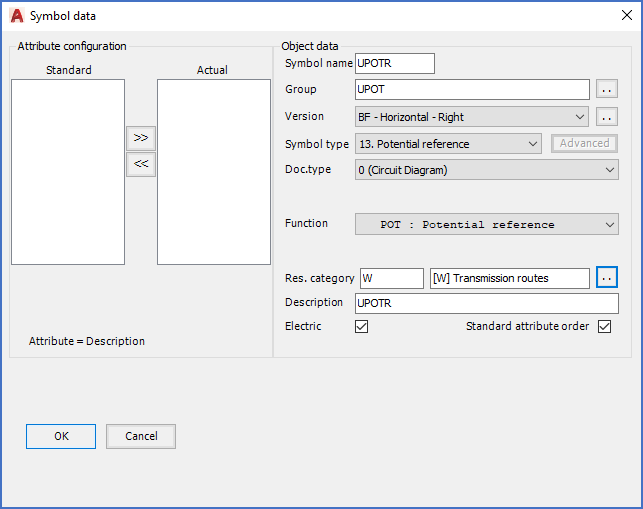
Figure 1239: A user defined potential reference symbol aimed at being placed in the right end of horizontal lines is being created.