|
<< Click to Display Table of Contents >> The “Layers” panel |
  
|
|
<< Click to Display Table of Contents >> The “Layers” panel |
|
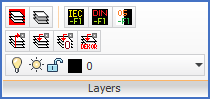
Figure 776: The "Layers" panel
The Layers panel does not have a slide-out panel. All commands are directly visible and explained in sub-topics listed below.
•Set Classic IEC layer colours
•Set Classic DIN layer colours
•Set background independent layer colours
•Activate layer of selected object